Crux Climbing Pants: Design Options
Style
Leg length
Leg length type
- Type: List
- Default: long
- options:
- long
- capris
- shorts
- custom
The length of the pant legs can be changed with this option. You can choose one of the pre-defined settings, or enter a custom value.
- ‘Long’ is a full-length pair of pants.
- ‘Capris’ end just below the knee.
- ‘Shorts’ end just above the knee.
- ‘Custom’ allows you to change the length to your own desire.
Pockets
Front pocket type
The type of front pocket
- Type: List
- Default: standard
- options:
- standard
- hole
- square
- diamond
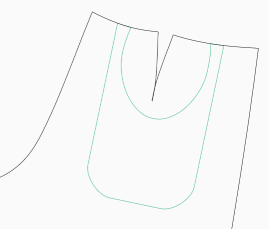
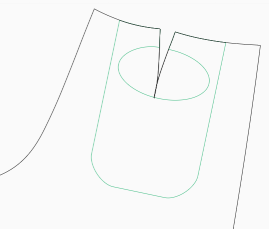
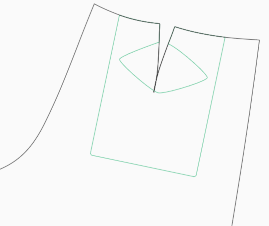
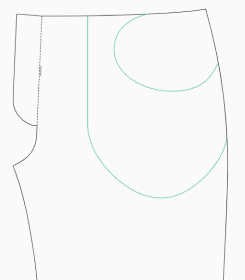
There are four types of pockets available. These options changed the shape and placement of the pocket opening.
Standard:


Front pocket on the inside
Invert the front pocket
- Type: Boolean
- Default: false
Normally the pockets are patch pockets on the outside of the garment, with the pocket opening part of the pocket fabric.
This option allows you to move the pocket to the inside of the garment, with the opening part in the fabric of the front.
Back pocket type
The type of back pocket
- Type: List
- Default: standard
- options:
- standard
- hole
- square
- diamond
There are four types of pockets available. These options changed the shape and placement of the pocket opening.
Standard:

Waistband type
The type of waistband
- Type: List
- Default: standard
- options:
- standard
- elastic
- ribknit
The type of waistband
This option changes the type of waistband for the pants. There are three types:
- Standard: The waistband is a strip of fabric along the top of the pants. This is how most pants are constructed.
- Elastic: The waistband is constructed like the standard way, but with two exceptions: there is a little extra room generated in the back, and there should be a piece of elastic incorporated in the back of the waistband. This allows for a more flexible fit.
- Ribknit: The waistband is replaced by a band of ribknit fabric. Two small pieces of fabric are added to the front to create a space for the button and buttonhole.
Waistband position
Percentage between waist and hips
- Type: Percentage
- Default: 80%
- Minimum: 0%
- Maximum: 100%
Percentage between waist and hips
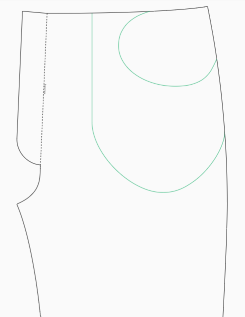
Where the pants have the waistband can be controlled with this option. The smaller the value, the higher the pants will be. 0% is on the waist, 100% is on the hips.
| 10% | 80% (Default) |
|---|---|
 |  |
Waistband width
The width of the waistband
- Type: Percentage
- Default: 3.2%
- Minimum: 1%
- Maximum: 10%
This option changes the width of the waistband. This is useful for the style you’re looking for, but also to accommodate the elastic or ribknit you’re planning to use if you selected those options.
This is a percentage of the Waist To Floor measurement.
Curved darts
Type of darts
- Type: Boolean
- Default: true
This option changes the shape of the darts in the back. Normally a curved dart will give a better fit. But for those for whom this doesn’t work, there is the option to make them straight.
| curved | straight |
|---|---|
 |  |
Conditional Options
Custom leg length
Set your own pant leg length
- Type: Percentage
- Default: 95%
- Minimum: 40%
- Maximum: 100%
Set your own pant leg length. This is a percentage of the waist to floor measurement. The value can range from 40% to 100%. The default is 95%, which is what the Long setting uses too.
This setting is only available if the Leg Length option is set to ‘custom’.
Cargo front pocket
Add extra space
- Type: Boolean
- Default: false
This option will generate strips of fabric that can be inserted between the pocket and the front part. It will allow for the pocket to have more volume.
Not available when the inside option is enabled
Front pocket cargo width
Adjust the width of the extra strip of fabric
- Type: Percentage
- Default: 2%
- Minimum: 0.3%
- Maximum: 5%
Adjust the width of the extra strip of fabric. this is set in a percentage of the Waist To Floor measurement. The larger the percentage, the move volume you’ll have in the pocket.
Only available when cargo front pocket is enabled.
Back pocket on the inside
Invert the back pocket
- Type: Boolean
- Default: false
Normally the pockets are patch pockets on the outside of the garment, with the pocket opening part of the pocket fabric.
This option allows you to move the pocket to the inside of the garment, with the opening part of the fabric of the back.
The ‘square’ version of the back pocket can only be on the outside.
Cargo back pocket
Add extra space
- Type: Boolean
- Default: false
placeholder
Back pocket cargo width
Adjust the width of the extra strip of fabric
- Type: Percentage
- Default: 2%
- Minimum: 0.3%
- Maximum: 5%
Adjust the width of the extra strip of fabric. this is set in a percentage of the Waist To Floor measurement. The larger the percentage, the move volume you’ll have in the pocket.
Only available when cargo back pocket is enabled.
Articulated knee
Type of pants leg
- Type: Boolean
- Default: true
Adds darts to created a shaped knee. This will make movement in the knee easier.
Hem type
The type of hem
- Type: List
- Default: hem
- options:
- hem
- ribknit
There are two options for the hems; standard, or rib knit. You can use the standard hem to incorporate an elastic cord if you so please.
The rib knit option removes the hem section of the pant legs.
Hem length
Length/Width of the hem
- Type: Percentage
- Default: 3%
- Minimum: 1%
- Maximum: 10%
This option controls the size of the hem.
This is a percentage of the waist to floor measurement.
Fit
Waist reduction
Make the waist band smaller than calculated
- Type: Percentage
- Default: 0%
- Minimum: 0%
- Maximum: 10%
This reduces the length of the waistband, and the ‘top’ of the front and back pattern pieces. This will make the pants narrower at the waist.
Gusset
Extra Gusset space
Adds extra space between the front and the back in the gusset
- Type: Percentage
- Default: 0%
- Minimum: 0%
- Maximum: 100%
This adds extra space between the front and the back in the gusset. Think of it as creating ease in the cross seam.
Gusset depth
How far down the leg the gusset extends
- Type: Percentage
- Default: 20%
- Minimum: 5%
- Maximum: 25%
This controls how far down the leg the gusset extends.
Gusset Width in the front
How far up the front seam the gusset extends
- Type: Percentage
- Default: 25%
- Minimum: 20%
- Maximum: 50%
This controls how far up the front the gusset extends.
Gusset Width in the back
How far up the back seam the gusset extends
- Type: Percentage
- Default: 15%
- Minimum: 5%
- Maximum: 20%
This controls how far up the back the gusset extends.
Fullness
Add extra fullness to the pant legs
- Type: Percentage
- Default: 0%
- Minimum: 0%
- Maximum: 25%
Adds more space to the bottom the legs for a looser style.
Hip shift
Shifts fabric from the front to the back. This is to compensate if you need extra space around the hips in the back of the front. Negative numbers move it to the back.
- Type: Percentage
- Default: 0%
- Minimum: -10%
- Maximum: 10%
Shifts fabric from the front to the back at the hips. This is to compensate if you need extra space around the hips in the back of the front.
Negative numbers move it to the back.
Advanced
Fly width
The width of the fly
- Type: Percentage
- Default: 3.8%
- Minimum: 2%
- Maximum: 6%
This controls the width of the fly. Adjust when your waist is large or small.